Events (and everything related to them)
The last main calendar functionality is "Events.” “Events” can be placed on both the
single-day and multi-day calendars.
Single-Event Calendar
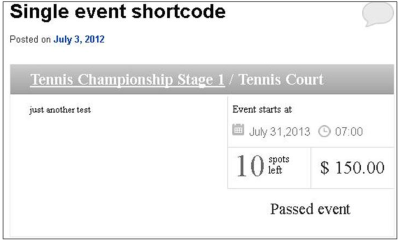
In the Single-Event calendar below, a Tennis championship has been scheduled. This particular
event occurs only one time, on July 31, 2013 at 7:00. The cost is $150, and there are 10 spots
left.
To produce this calendar in your wordpress, you would use the [BW_event id="eventID"]
shortcode, which displays the information and booking button for one particular event. The event
ID can be retrieved from the events list table in the admin panel.
Multiple-Event Calendar
If you are planning an event that will occur more than once, it would be placed on a
Multiple-Event calendar. You can produce a Multiple-Event calendar by using the
[BW_events_list] shortcode, which will display all events from all calendars for the current
month.
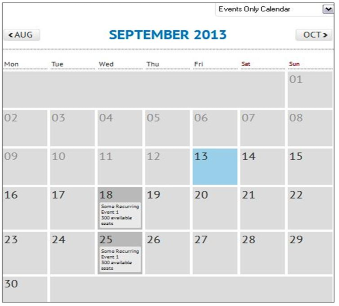
In the calendar below, the event occurs on two days, September 18 and 25.
In our example, the user chooses to attend the event on September 18, so she clicks on the
18th and the following box opens:
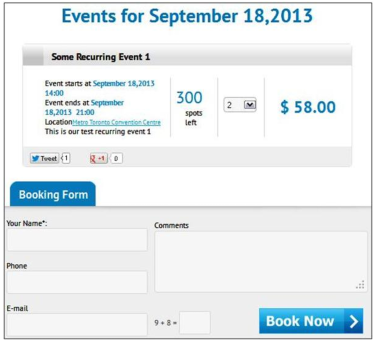
Note that the event begins on September 18 at 14:00 (2:00pm), ends at 21:00 (9:00pm), and
costs $29 per spot. There are 300 spots left. In our example, the user books 2 spots, which
totals $58.
After she completes the Booking Form, she receives the following alert:
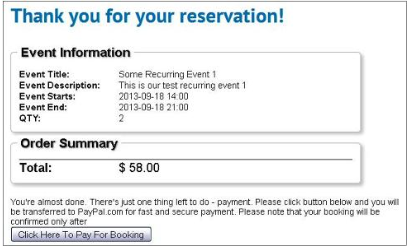
She then receives confirmation of her booking time and date, and her order total. Then she is
given a pay button to click to pay for the booking.